we set it up with you
the setup is the product.
it happens at your counter.
most restaurant software is sold remotely, in English, and left for the owner to figure out. that's why the ordering link in your POS gets no orders. this one is set up at your restaurant, in your language, by the person who built it. about 90 minutes.
about 90 minutes of your time · we bring the device and the printed kit · no contract
the 90 minutes
a morning, before lunch. you cook. we set up.
this is what the visit looks like. the parts marked “you” are the only ones that need you at the counter. everything else we do while you work.
- 🔌we bring everything. the handheld, the paper, the printed kit, the guarantee. you provide a plug and your wifi password.
- 🍳you don't stop cooking. we work around service. the three things that need you take about twenty minutes together.
- 🧾it ends with a ticket. we place a test order from our phone and tear the first ticket off the handheld with you.
- 0:00the handheld goes on the counterplug, wifi, a test order. the first ticket prints before we do anything else.
- 0:15your menu, on your phoneyouyou open your own site like a customer and tell us what's wrong. we fix it there.
- 0:30the kit goes upthe counter card by the register. bag cards in the bag station. the order-direct slip loaded on the handheld.
- 0:45the gifts, chosen from your menuyouwelcome gift, come-back gift, we-miss-you. you pick the dishes. we set the guards and switch them on.
- 1:00your staff get two sentenceswhat to say when a regular asks about the QR, and what to say when the handheld chimes. that's the training.
- 1:15the guarantee, signedyouone page, two signatures. then we open your first export together so you've seen the button work.
- 1:30liveyour site is taking orders. the handheld is listening. we're still there for the first real one if it comes.
what we bring
the launch kit.
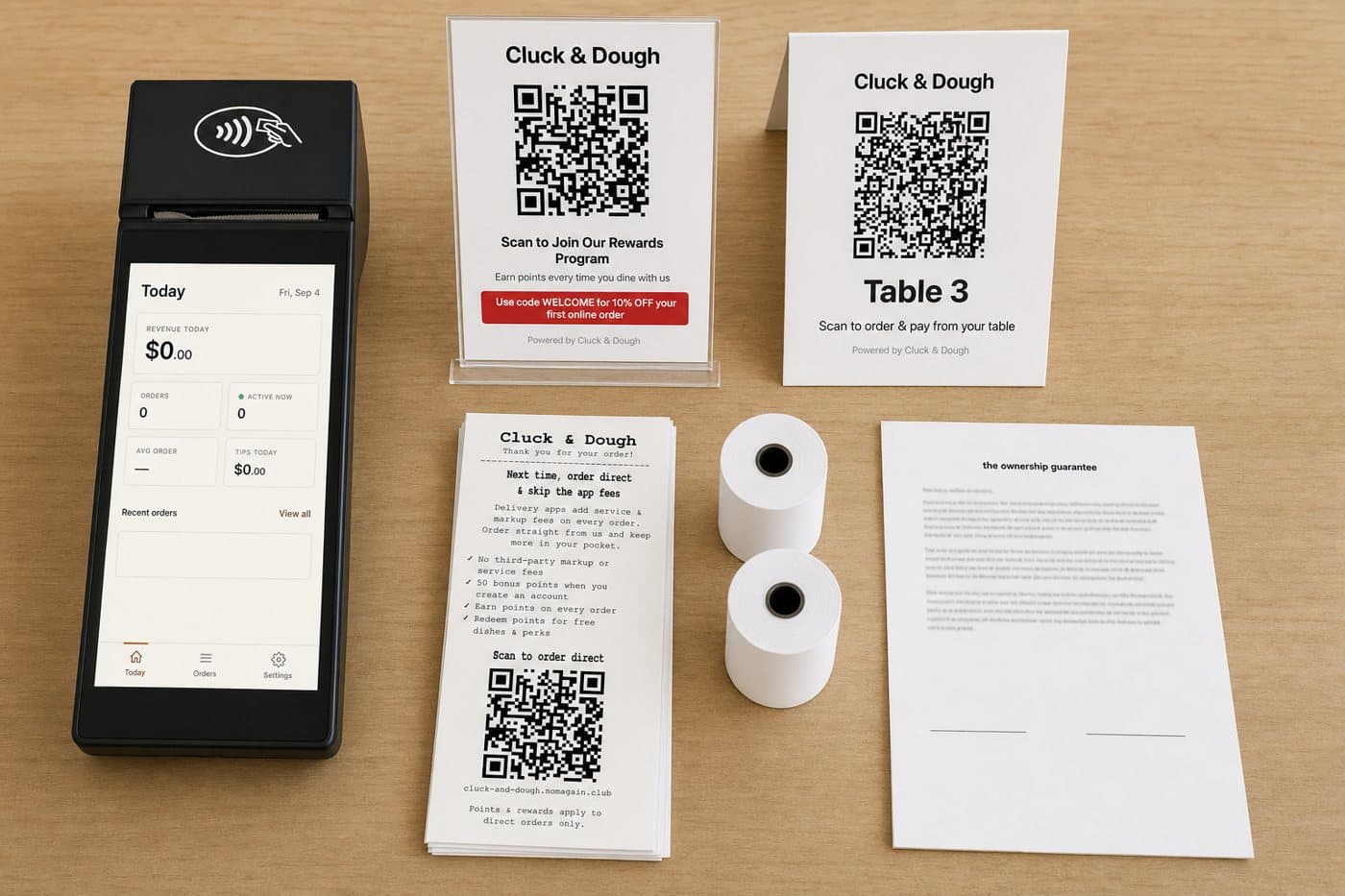
this is what comes with the setup. nothing to order, nothing to print yourself.
- the handheld. prints kitchen tickets and receipts, chimes for new orders, rings up walk-ins.
- the counter card. your QR in a stand by the register, with the welcome offer on it.
- bag cards. the same QR, sized for the bag station.
- the order-direct slip. printed from the handheld into every delivery-app bag. English, Chinese, or both.
- table tents. one per table, if your room orders at the table.
- the ownership guarantee. one page, signed with you, your copy stays.
the kit is itemized at cost on the pricing page.
your staff get two sentences
that's the whole training.
nobody learns a system. the handheld has two buttons that matter, and your staff need two lines. we write them in your staff's language and tape them by the register.
“scan that and order there next time. you get points, and there's a welcome gift on your first order.”
the card does the rest. no sign-up sheet, no pitch.
“tear the ticket, cook it, tap ready.”
accept can be automatic. ready is one tap, and it sends the customer their message.
illustrative wording. we write yours with you, in your staff's language.
the two weeks after
a site nobody points to gets no orders. so we keep pointing.
the setup gets you live. the first two weeks get you regulars. we stay on it.
we watch the first orders with you
every ticket, every scan. if something prints wrong or a customer gets stuck, we fix it that day and tell you what changed.
the first export, in your hands
you open your customer list as a file. we walk through who signed up, who scanned, and who came back.
the first gifts go out
the welcome gift has been landing since day one. now the come-back gift starts reaching second-timers, and we check the counters with you.
already true today
three restaurants, set up this way.
- 3 independent restaurants use NomAgain today, each set up in person
- set up at the counter, in the owner's language
- $8,000+ in orders that skipped the apps, at one restaurant since April
- no contract. leaving is free, so staying is a choice
I used to rely on other people's sites, and they took 20–30%. Now I have my own, and that's more revenue for the shop.
three questions owners ask
“I don't have time for a setup.”
it's a morning before lunch, and you're cooking for most of it. the three parts that need you take about twenty minutes. everything else we do around you.
“my staff won't use it.”
there's nothing to learn. the handheld chimes, they tear the ticket, they tap ready. two sentences, taped by the register, in their language. we've done this with kitchens that never touched a tablet.
“what if it doesn't work for us?”
then you leave, and it costs nothing. no contract, no termination fee, your list exported from your own dashboard. the guarantee you sign at setup says so in writing.
before the setup
it starts with your restaurant's name.
fill out the quick form. a sample page with your logo and menu comes back in a day or two. if you like it, we pick a morning.
- fill out the quick form
restaurant name and how to reach you. 30 seconds - a sample page comes back
your logo and info, in a day or two. open it like a customer - pick a morning
the 90 minutes above. done by lunch
want to see your restaurant on it?
tell me your restaurant's name. I'll send back a sample ordering page with your logo and info. no meeting, no sales call.
get your free demoabout 90 minutes of your time · we bring the device and the printed kit · no contract